

iOS 27 Beta 5: The Polished Pre-Launch Preview
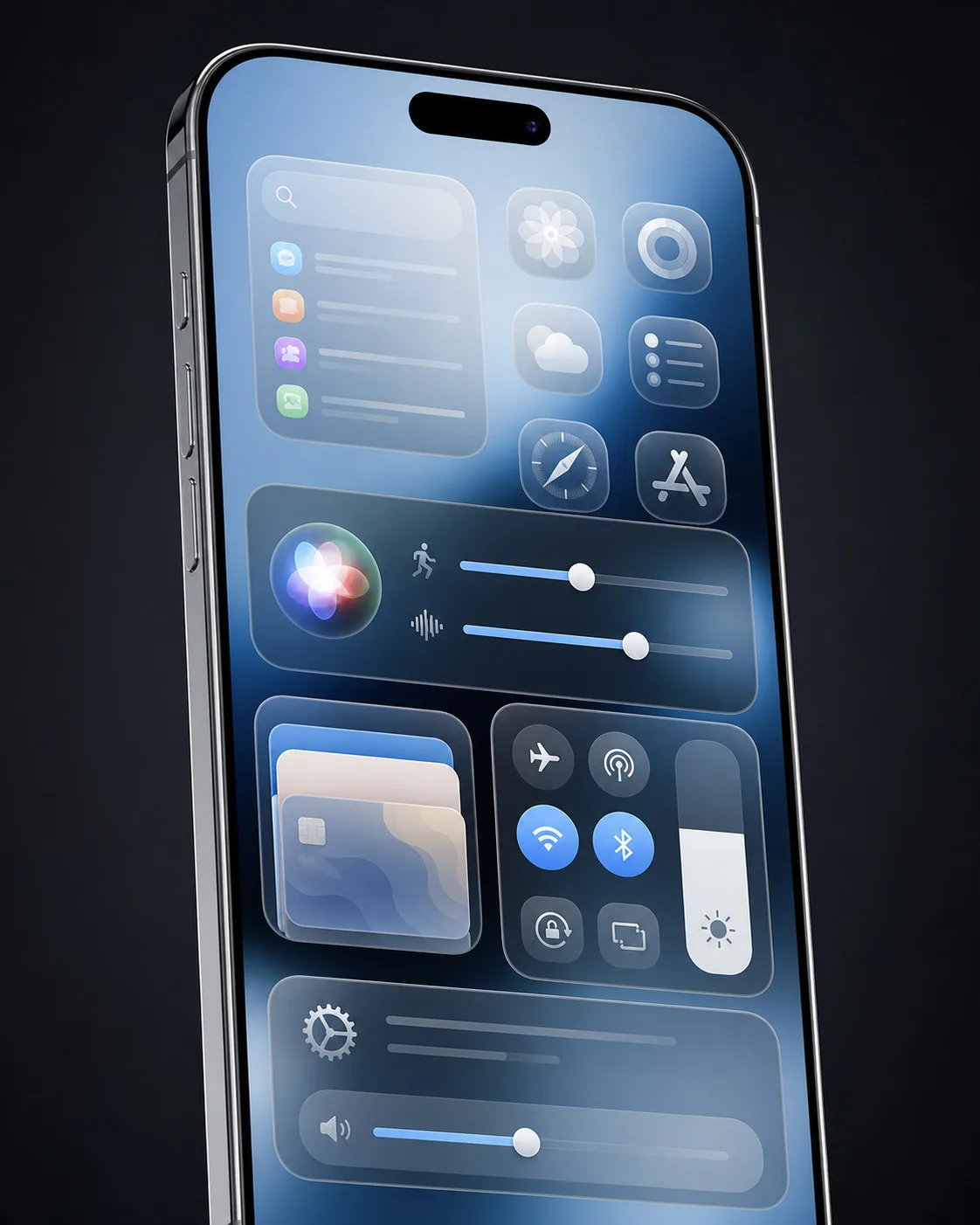
We’re just weeks away from the full release of iOS 27, and Beta 5 makes it crystal clear that Apple is now in polish-and-perfect mode. This build doesn’t introduce massive headlining features, but it does refine almost every corner of the experience: sharper Liquid Glass icons, deeper Siri AI voice controls, smarter Search, and subtle quality-of-life tweaks that make your iPhone feel more premium and more personal.
Below is a complete deep dive into everything new in iOS 27 Beta 5, how it all fits into Apple’s broader design direction, and what to expect when the public version ships next month.
Liquid Glass Icons: Apple’s Visual Overhaul Continues
The most immediately noticeable change in iOS 27 Beta 5 is yet another wave of refreshed Liquid Glass icons. Apple teased a more layered, translucent iconography style at WWDC, and this beta pushes that aesthetic even further.
Updated App Icons
Several core apps now have updated Liquid Glass icons:
- Safari – The icon now features a brighter blue background with more detailed compass lines and arrows. It pops harder on both Light and Dark Mode home screens and better matches the glassy, layered theme Apple is pushing.
- Siri – The Siri app icon now looks much closer to the actual Siri bubble animation you see when invoking Siri. It’s more fluid, more three-dimensional, and clearly designed to align with the new Siri AI branding.
- Settings – More translucency has been added, giving the familiar gear motif a subtle layered, glass-like appearance without losing its instantly recognizable shape.
- App Store – The App Store icon is now more translucent, making each line of the signature “A” symbol more distinct and visually separated. It’s a small tweak that makes the icon feel lighter and more modern.
- Remote – The Remote app icon gains extra visual detail and switches to a gray background instead of black. This better matches the rest of the Liquid Glass set and makes the icon less visually heavy.
- Preview – This one gets the boldest change: an entirely new look with a loupe (magnifying glass) over a colorful background. It’s more illustrative and clearly communicates the app’s role as a viewer and markup tool.
These join the icons that were already updated in earlier iOS 27 betas, including Maps, Photos, and Weather, which had previously shed their iOS 26 look in favor of the new layered, glassy aesthetic.
Apple has already said that more icons will be refreshed before release, so Beta 5 likely isn’t the final word. Expect additional system and first‑party apps to receive Liquid Glass treatments in the next builds.
Siri AI Voice Customization Gets Deeper
One of the most exciting areas of iOS 27 is the evolution of Siri AI. With Beta 5, Apple is doubling down on personalization by expanding voice customization controls.
Pace and Expressivity Controls
Siri AI voice customizations now support:
- Pace – Fine‑tune how fast or slow Siri speaks.
- Expressivity – Adjust how dynamic, emotive, or neutral Siri’s voice sounds.
These options are now available for:
- All seven American voices
- All four British voices
This means you can not only pick your preferred voice but also dial in how conversational or straightforward it sounds. Want a calm, neutral assistant or a more expressive, human‑like tone? iOS 27 Beta 5 lets you choose.
On-Device Processing and Hardware Limits
There is a catch: Siri AI voice customization is processed entirely on-device, which is great for privacy and latency but demands serious hardware. As a result, this feature is limited to:
- iPhone 17 Pro
- iPhone 17 Pro Max
- iPhone Air
If you’re on older hardware, you’ll still see the standard Siri options, but the advanced AI voice tuning sliders won’t be available. This is a clear sign of how much Apple is leaning into on-device AI and using its latest chips to differentiate the high end of the lineup.
Contacts: Company Names Surface Front and Center
The Contacts app gets a subtle but genuinely useful improvement in iOS 27 Beta 5.
If a contact has a company name associated with it, that company field now shows up:
- Directly under the contact’s name in the contact list
- In search results
This makes it much easier to quickly identify work contacts, vendors, or business partners without having to tap into each contact card. For users with large professional networks, this is a small change with outsized impact on everyday usability.
Apple Wallet: Create a Pass Goes Global
The Create a Pass feature in Apple Wallet is finally breaking out of its U.S.-only bubble.
Create a Pass Now Available Internationally
With iOS 27 Beta 5, the Create a Pass option in Wallet is now available outside of the United States. While Apple hasn’t published a full country list inside the beta notes, early testers are already reporting availability in multiple regions.
This feature lets users generate custom passes—like event badges, membership cards, or internal access passes—that can be distributed and stored directly in Wallet. For businesses, venues, and organizations, this opens the door to more frictionless, digital-first experiences globally, all anchored in the familiar Apple Wallet interface.
New Splash Screens for Core Apps
When you first open certain apps after installing iOS 27 Beta 5, you’ll see new splash screens explaining what’s new.
Updated splash screens now appear for:
- Photos
- Wallet
- Music
These quick, one-time panels highlight the key changes and features introduced in iOS 27, making it easier for casual users (who might not read release notes) to immediately understand what’s different.
Search and Ask: Smarter, Smoother, More Web-Aware
Apple continues to refine the Search and Ask experience in iOS 27, and Beta 5 delivers both visual and functional improvements.
Refined Animation and Suggestions
The animation when pulling up Search or Ask has been subtly tweaked. Previously, suggestions would pop in just after the search bar appeared. In Beta 5:
- The suggestions interface now appears in sync with the search bar itself.
It’s a small animation timing change, but it makes the whole interaction feel more fluid and intentional.
New “Search the Web” Shortcut
There’s also a new “Search the Web” option at the bottom of search results. Instead of manually switching contexts to Safari, you can:
- Type a query in Search/Ask
- Scroll down
- Tap “Search the Web” to jump straight into a full web search
This better bridges on-device content and online results, reducing friction and making universal search feel genuinely universal.
Apps in Search: More Control Over What Shows Up
For power users, iOS 27 Beta 5 introduces granular control over how apps appear in Search.
You can now configure whether app results show at all, and if they do, how many appear:
- Off – Hide app results entirely
- 4 apps – Show a compact row of up to four apps
- 8 apps – Show a larger set of up to eight apps
There’s also a toggle for app shortcuts, letting you decide whether app-specific actions (like “New note” or “Start timer”) show up in search suggestions.
This is especially useful if you prefer a cleaner search experience, or if you want Search to focus on documents, messages, and web results rather than cluttering the UI with every app installed on your device.
Control Center: Cleaner Network Status
Control Center sees a small but welcome declutter.
- When your iPhone is connected to Wi‑Fi, Control Center no longer shows cellular connection info.
You still have full visibility into Wi‑Fi status, but the removal of redundant cellular indicators helps reduce visual noise. It’s a cleaner snapshot of what actually matters when you’re on a stable wireless network.
5G+: Expanded Availability in Spain
On the connectivity front, iOS 27 Beta 5 quietly flips the switch on 5G+ support in Spain.
If you’re on a compatible carrier and device, you should now see 5G+ in the status bar where available, signaling access to higher‑capacity, higher‑throughput 5G networks. This is part of Apple’s ongoing rollout of enhanced 5G branding and capabilities across more regions.
Software Update Info: See When You Last Updated
In Settings > General > About, the software version section now shows when the last update was installed.
This is a small but powerful addition for:
- Troubleshooting issues after a recent update
- Verifying when a device was last patched
- Tracking how up to date a shared or managed device is
For anyone who manages multiple iPhones or runs into bugs and needs to correlate behavior with OS changes, this timestamp is incredibly handy.
Clock App: Bolder Alarms and Timers
The Clock app gets a tiny visual tweak that improves readability:
- The Alarms and Timers sections now use a thicker font.
This makes active alarms and countdowns easier to read at a glance, especially in low light or from a distance—exactly when you’re most likely to be checking them.
Liquid Glass: Even Clearer at the Top Setting
Apple’s Liquid Glass visual style isn’t just about icons—it also extends to system UI elements and transparency effects.
In iOS 27 Beta 5, the clearest Liquid Glass setting is now even clearer than in prior betas. That means:
- Less visual haze
- Sharper content behind translucent surfaces
- A more premium, glass‑like effect overall
If you’ve been experimenting with the different Liquid Glass levels, you’ll notice that the highest clarity setting feels more refined and less milky, especially on high-brightness and HDR content.
Mail: Control Over Personalize Smart Replies
The Mail app in iOS 27 Beta 5 gains a new privacy‑ and preference‑friendly toggle.
Personalize Smart Replies Toggle
There’s now a dedicated switch for Personalize Smart Replies in:
- Settings > Mail
Key details:
- The feature is off by default.
- You can manually turn it on to enable more context‑aware, personalized suggested replies.
This gives users direct control over how much intelligence Mail applies to their outgoing responses, which is especially important for privacy‑conscious users or those who simply prefer to craft their own replies.
Battery: Clearer Warnings About Poor Signal Drain
Battery diagnostics are getting smarter in iOS 27, and Beta 5 adds another helpful hint.
In Settings > Battery, iOS can now tell you if a poor cellular connection is causing extra battery drain.
Instead of guessing why your battery suddenly tanked during a day out, you’ll get explicit feedback that your phone was working harder to maintain a signal. This is great for understanding real‑world battery behavior and planning around low‑signal environments like stadiums, rural areas, or underground transit.
If you’re preparing to sell or trade in your iPhone and want to document its condition and performance, pairing this insight with a guide like Everything You Should Consider Before Selling Your Device can help you present a more accurate picture to buyers.
Tech Specs & Device Support Snapshot
While iOS 27 Beta 5 doesn’t change the official compatibility list, some features are clearly hardware‑dependent.
Key Feature Requirements
- Siri AI Voice Customization (Pace & Expressivity)
- Requires on-device AI processing
Supported devices:
- iPhone 17 Pro
- iPhone 17 Pro Max
- iPhone Air
5G+ in Spain
Requires:
- A 5G‑capable iPhone
- A carrier in Spain that supports 5G+
Liquid Glass Highest Clarity Improvements
Available on all iOS 27‑compatible devices, but looks best on:
- OLED displays
- High‑brightness and HDR‑capable models
Create a Pass in Wallet (International)
- Requires:
- iOS 27 Beta 5 or later
- A region where Apple has enabled the feature
As always, Apple is using its latest silicon to unlock the most advanced AI features while still ensuring that the broader iOS 27 experience—icons, UI refinements, Search improvements—feels fresh across the entire supported lineup.
Why Beta 5 Matters Before Launch
iOS 27 Beta 5 might not introduce a headline‑grabbing new app or tentpole feature, but it’s a critical pre‑launch milestone. This build is all about:
- Visual consistency – More Liquid Glass icons and clearer transparency effects
- Personalization – Deeper Siri AI controls, smarter Mail replies, customizable search behavior
- Clarity and feedback – Better battery explanations, update timestamps, and contact/company visibility
- Global readiness – 5G+ in Spain and Wallet’s Create a Pass expanding beyond the U.S.
For developers, marketers, and store owners preparing their apps and product pages for iOS 27’s launch, now is the time to align visuals and copy with Apple’s updated design language. If you’re crafting App Store listings or e‑commerce pages that showcase iOS 27‑optimized apps or accessories, resources like Everything You Need to Know About SEO-Optimized Product Descriptions are invaluable for standing out when the update drops.
With just about a month to go, iOS 27 Beta 5 feels less like an experiment and more like a near‑final preview of Apple’s next major iPhone experience—sleeker, smarter, and more transparent in every sense of the word.
Source: Read Original Article






Leave a Reply