
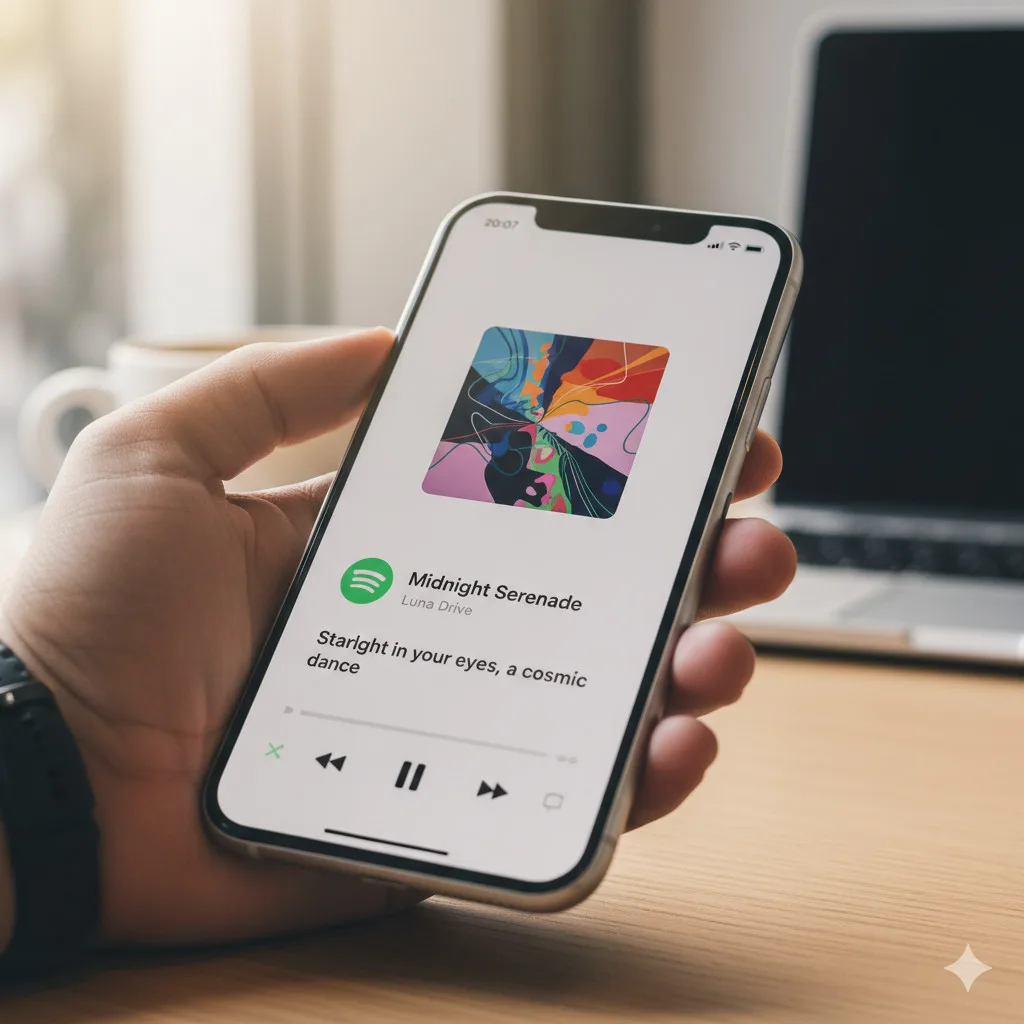

What’s changing in Spotify’s Now Playing screen
Spotify is rolling out a subtle but meaningful interface update: lyrics are moving closer to the center of attention. Instead of requiring a scroll or a tap into the lyrics panel, some users are now seeing the current lyric line displayed directly on the Now Playing screen, positioned just under the album art.
The change was first spotted by users in the wild (including reports on Reddit), and it appears to be a server-side update—meaning Spotify can enable it for certain accounts without requiring a full app update from the App Store or Google Play.
For anyone who likes to sing along, learn a song’s words, or catch hard-to-hear lines, this is a convenience upgrade: the lyric you need is now immediately visible while listening.
A server-side rollout: why you might not see it yet
One key detail from early sightings is that the feature is likely being deployed as a server-side experiment. In practice, that means:
- Two people on the same app version may see different interfaces.
- Spotify can A/B test the feature, iterate quickly, or roll it back.
- The rollout may be gradual across regions, devices, and account types.
If you don’t see the lyric line on your Now Playing screen today, it doesn’t necessarily mean your app is outdated. It may simply not be enabled for your account yet.
The full lyrics view still exists (and it’s not going away)
Importantly, this new lyric snippet doesn’t replace Spotify’s existing lyrics experience. Users report that the full lyrics window is still available below the Now Playing screen, so you can continue to scroll into the full panel and follow along line-by-line.
Think of the new overlay as a preview or quick glance layer:
- The Now Playing screen shows a lyric line under the album art.
- The full lyrics panel remains accessible beneath the main player.
This is a familiar UI pattern in modern apps: put the most “likely needed” info at the top, while keeping the deeper experience one gesture away.
You can turn it off if you don’t want lyrics on screen
Not everyone wants extra text on a minimal player view—especially if you use Spotify while driving, working, or simply prefer a clean Now Playing layout.
According to early reports, Spotify is including a toggle to disable the new lyric line. That’s a strong sign Spotify expects mixed reactions and is designing for both preferences:
- On: quick lyric visibility without scrolling.
- Off: a cleaner Now Playing screen, closer to the traditional layout.
If you receive the update and find the lyric overlay distracting, you should be able to revert to a more classic look.
Resizable lyrics in full-screen mode (spotted in Beta)
Alongside the lyric-on-player tweak, users have also noticed another quality-of-life improvement in the Spotify Beta app: the ability to resize lyrics in full-screen mode.
This matters more than it sounds. Lyrics are often used in real-world situations where readability is everything:
- Listening across the room (e.g., speaker playback)
- Karaoke-style sing-alongs
- Accessibility needs (larger text)
If Spotify brings lyric resizing to the stable release, it could be one of the more practical accessibility wins in the app’s recent UI changes.
Why Spotify is leaning into lyrics right now
Spotify has been steadily adding features that make listening feel more interactive and personalized. Lyrics fit naturally into that strategy because they:
- Increase time spent in the app (more engagement during playback)
- Encourage active listening and sharing
- Add value even when you’re not actively searching for information
This lyrics update also lands amid other Spotify experiments and launches, including AI-assisted playlist creation.
The bigger context: Spotify’s “Prompted Playlists” and AI features
Spotify recently introduced Prompted Playlists, which allow users to generate playlists using a written prompt—an AI-forward feature aimed at making discovery faster and more tailored.
Together, these features suggest a clear direction: Spotify wants the playback screen and discovery tools to feel more like a smart companion, not just a list of tracks.
For readers who track frequent app changes and streaming feature rollouts, tools that organize and contextualize releases can help—see How Calendia Streamlines Content Tracking in a World Overflowing with Releases for a broader look at managing the constant flow of new drops and updates.
How to check if you have the new lyric overlay
Because this appears to be server-side, the usual “update the app” advice may not be enough. Still, there are a few practical steps you can try:
- Update Spotify to the latest version available on your device.
- Force close and reopen the app (or restart your phone).
- Log out and log back in (sometimes refreshes account-side feature flags).
- Check if you’re enrolled in Spotify Beta (Beta builds often get UI experiments earlier).
If the feature is enabled for you, you’ll typically notice it immediately: play a song and look under the album art on the Now Playing screen.
What this means for everyday listening
For beginners or casual Spotify users, this update is easy to understand: less scrolling, faster access to lyrics.
Here’s how it may change day-to-day use:
- Learning lyrics becomes passive: you may pick up lines just by glancing.
- Sharing and quoting gets easier: you’ll catch memorable lines in real time.
- The player becomes “busier”: some users may feel it adds clutter.
Spotify’s choice to include an off switch is important. It acknowledges that the ideal Now Playing screen differs by user.
Potential downsides (and why some users may dislike it)
Even small UI changes can be polarizing, and early reactions already show a split. Common concerns include:
- Visual clutter: some people want the album art and controls to be the focus.
- Distraction: lyrics can draw attention away from other tasks.
- Redundancy: users who already scroll for lyrics may not want an always-visible snippet.
In other words, the feature is helpful when you want it—and annoying when you don’t. That’s why the toggle is more than a minor setting; it’s a key part of making the change acceptable to a wide audience.
Platform notes: iOS vs Android, and what “server-side” implies
Spotify’s interface and feature timing can differ between iOS and Android, but server-side rollouts often aim to reduce those gaps. Still, you may see:
- Different placement or styling between platforms
- Faster rollout on one OS than the other
- Beta-only controls (like resizing) appearing first on specific devices
For official details on Spotify’s product and platform availability, you can reference Spotify directly.
Tips: make lyrics more useful once you have them
If you’re getting the new lyric line, a few simple habits can make it more valuable:
- Use it to verify song versions (live vs studio often differ).
- Catch lyric lines to search for remixes or covers.
- Combine lyrics with Spotify’s discovery tools to explore an artist’s catalog.
And if you’re the type who experiments with Spotify experiences on mobile, it’s worth understanding what’s official, what’s beta, and what’s third-party. For example, some users search for modified clients—here’s a related explainer: Download and Install Spotify++ (Spotify with Premium Features) on iOS.
When will everyone get it?
There’s no firm public timeline yet. Based on how Spotify typically ships server-side UI changes:
- It may appear first for a small percentage of users.
- It may expand over days or weeks.
- Some regions or account types may get it later.
If you don’t have it now, the most realistic advice is simple: wait and keep your app updated.
Bottom line
Spotify’s new Now Playing lyric overlay is a small UI tweak with outsized impact: it makes lyrics immediate rather than optional after scrolling. With an on/off toggle and potential full-screen lyric resizing spotted in Beta, Spotify appears to be balancing convenience with customization.
If the rollout continues as expected, this could become one of those “once you have it, you miss it when it’s gone” features—especially for listeners who treat lyrics as part of the song, not an extra.
Source: Read Original Article





Leave a Reply